The Vibe Coding Workflow
Vibe coding has changed how software gets built. You describe what you want in plain language. An AI tool — Cursor, Windsurf, Replit, Bolt, Lovable — reads your prompt and generates the code. You review the output, iterate, and refine. The cycle repeats dozens of times per hour.
The entire paradigm runs on natural language. Your ability to clearly and quickly describe what you want determines how fast you ship. The bottleneck is no longer how fast you can write code — it is how fast you can write prompts. And right now, you are typing those prompts at 40 words per minute.
Speak Your Prompts 3x Faster
A detailed prompt for Cursor or Windsurf is typically 50 to 100 words. Typing that takes 60 to 90 seconds. Speaking it takes 20 to 30 seconds.
That difference compounds. A productive vibe coding session involves 50 or more prompts. At 60 seconds saved per prompt, that is 30 to 40 minutes per day — time you get back for reviewing code, testing, or shipping the next feature. Over a week, that is three to four hours. Over a month, you have recovered more than two full working days.
The speed advantage is not just about raw words per minute. When you speak, your thoughts flow more naturally. You describe the full picture — the edge cases, the error handling, the specific behavior you want — instead of shortcutting your prompt because typing it out feels tedious. Better prompts mean better generated code, fewer iterations, and less debugging.
Your Code Stays on Your Mac
Here is something most vibe coders do not realize about Wispr Flow: it captures screenshots of your active window and sends them to cloud servers. That means your code, your file tree, your terminal output, your environment variables, and anything else visible on your screen gets transmitted to a third party.
If you are working on a startup's codebase, a client project, or anything proprietary, this is a serious problem. Your NDA does not have an exception for "my voice dictation tool screenshotted my IDE."
SpeakUp takes a fundamentally different approach. It runs whisper.cpp on your Mac's GPU using Metal acceleration. Audio goes in, text comes out. Zero network calls. Zero screen access. Zero file system access. Your code never leaves your machine, and SpeakUp never even sees it.
Faithful Transcription for Technical Content
Wispr Flow uses AI to "auto-edit" your dictation — it rewrites your words before inserting them. For casual messages, this might seem helpful. For technical prompts, it is destructive.
When you are crafting a precise prompt for Cursor, every word matters. "Add error handling to the OAuth callback and log the failure reason to Sentry" should appear exactly as you said it. It should not become "Implement error management for the authentication flow." The specific function name, the specific service, the specific behavior — these details matter to your AI coding tool. SpeakUp transcribes exactly what you say, without paraphrasing, rewriting, or "improving" your words.
Lexicons: Your Tools Actually Land Right
"Claude Code" turning into "cloud code." "Pydantic" becoming "pie dentic." "Hetzner" sliding into "head sner." "Supabase" showing up as "super base." Generic speech models don't know these names — so you end up fixing them by hand.
SpeakUp 1.0.26 ships a free Software Engineering Lexicon you can turn on under Settings → Lexicons. It covers roughly 1,000 hand-curated terms: AI tools (Claude Code, Cursor, Windsurf, Copilot), frameworks (Next.js, SvelteKit, FastAPI, Pydantic), cloud providers (Hetzner, Cloudflare, Vercel, Supabase), databases (Postgres, Redis, DuckDB), git verbs, Kubernetes vocabulary, the usual alphabet soup. In our benchmarks, turning it on gets about 4 more technical terms right for every 100 you dictate — enough that you stop re-reading every Cursor prompt looking for the usual casualties.
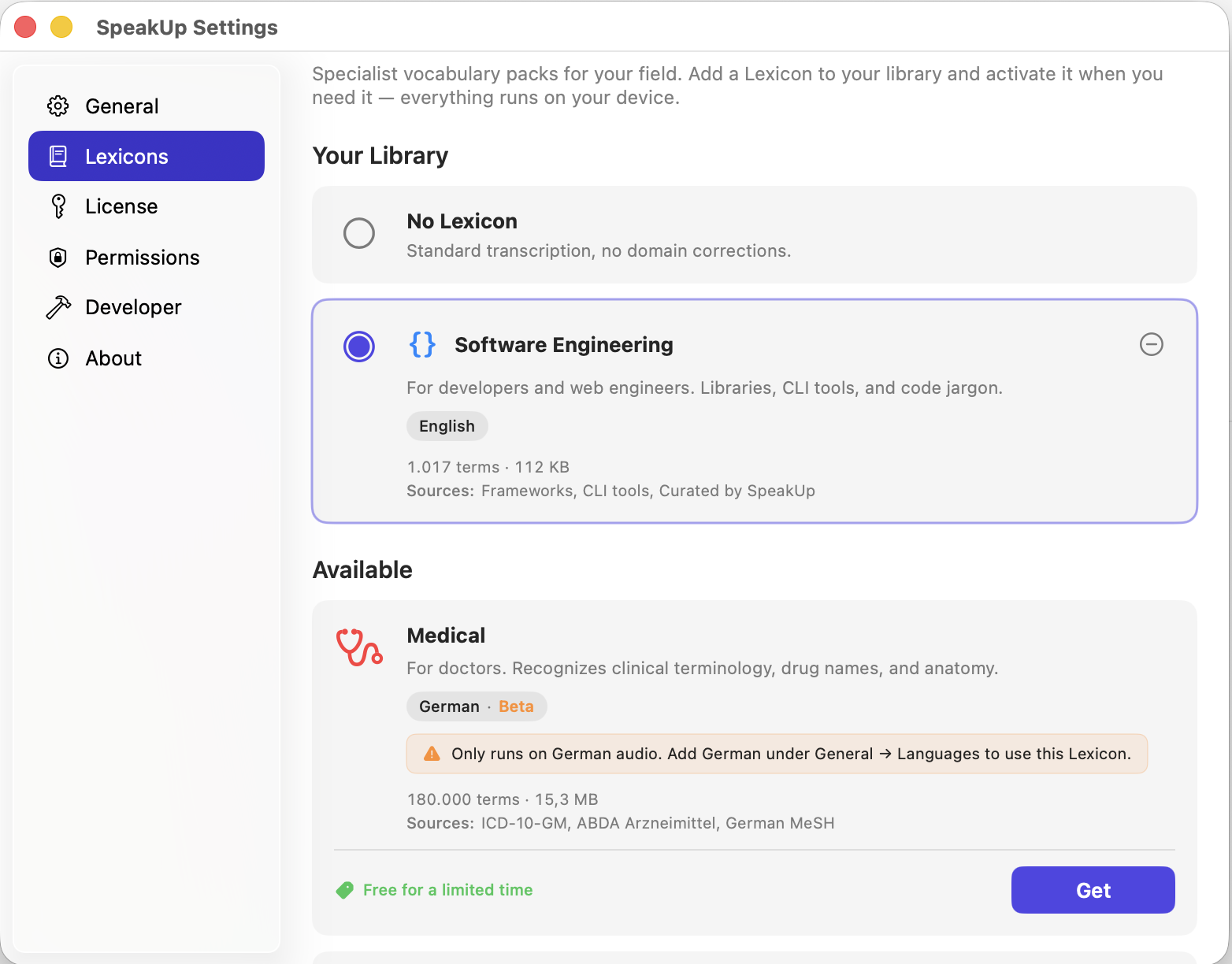
The Lexicon runs entirely on-device, like everything else in SpeakUp. It only kicks in when you dictate in English, so it won't interfere with notes you write in another language. Read more on how we build and test Lexicons.
Works in Every AI Coding Tool
SpeakUp works in any text field on your Mac. That includes:
- Cursor — chat panel, inline edit prompts, terminal
- Windsurf — prompt bar, cascade, command input
- Replit — AI assistant, code comments, chat
- Bolt and Lovable — prompt interfaces in the browser
- v0 — Vercel's generative UI tool
- Claude and ChatGPT — web and desktop apps
- GitHub Copilot Chat — in VS Code or JetBrains
- Terminal — any CLI prompt or command input
Wherever you type a prompt, you can speak it instead. Press your hotkey, speak, press again. Text appears at the cursor.
No More Subscriptions. Pay Once.
Developers already juggle too many subscriptions. Cursor Pro is $20 per month. GitHub Copilot is $10 per month. Claude Pro is $20 per month. ChatGPT Plus is $20 per month. Adding Wispr Flow at $12 per month — $144 per year — is yet another recurring cost for a tool that sends your data to the cloud.
SpeakUp is €29 once. No subscription, no renewal, no annual billing. One payment, and it works forever. Every update included.
Related: SpeakUp for Developers · Software Engineering Lexicon · SpeakUp vs Wispr Flow · whisper.cpp Benchmark on Mac